
-
-
May 8, 2012 at 3:29 am #2299
I am looking at buying a used M8 and need to determine the shutter count. The seller does not know as he bought it used. The latest picture shot on the camera was assigned L9997077.jpg by the camera. I am having a hard time determining which part of this file name is the folder name and which part is the hexadecimal number that needs to be converted. Any ideas? Thanks.
-
May 8, 2012 at 11:28 am #2300David FarkasNewbie
 Hollywood, FLJoin Date: Aug 2014Posts: 414Currently using:
Leica M, Leica S, Leica SL, Leica CLOffline
mbarzegar;2204 wrote: I am looking at buying a used M8 and need to determine the shutter count. The seller does not know as he bought it used. The latest picture shot on the camera was assigned L9997077.jpg by the camera. I am having a hard time determining which part of this file name is the folder name and which part is the hexadecimal number that needs to be converted. Any ideas? Thanks.
The file name is not a good indicator of shot count. If you have an EXIF viewer such as Opanda IExif you can just open the last JPG shot and look for a value called Unique Image ID. This value is given in Hex, so it will need to be converted into decimal. Use an online conversion tool like http://easycalculation.com/hex-converter.php to convert it. This is the shutter count of the camera.
David Farkas
Red Dot Forum
Leica Store Miami -
May 9, 2012 at 1:53 pm #2302
Hi David! Thanks for the reply. Since posting this I have tried to retrieve the data doing exactly what you describe. However, the EXIF viewer data does not show anything called Unique Image ID. The only data field that might be close to what you are describing is the following:
EXIF Version {0x9000} 0220
-
May 16, 2012 at 9:34 pm #2376David FarkasNewbie
Hollywood, FLJoin Date: Aug 2014Posts: 414Currently using:
Leica M, Leica S, Leica SL, Leica CLOffline If you are still having issues getting shutter count, try downloading the M8 Info program. There is also an M9 Info program here as well. Very easy.
David Farkas
Red Dot Forum
Leica Store Miami -
October 5, 2012 at 12:15 am #3063
Turn the camera on.
Press the right arrow key 4 times.
Press the left arrow key 3 times.
Press the right arrow key 1 more time.
Press the info button.
Scroll down to body debug data.
Press Set.
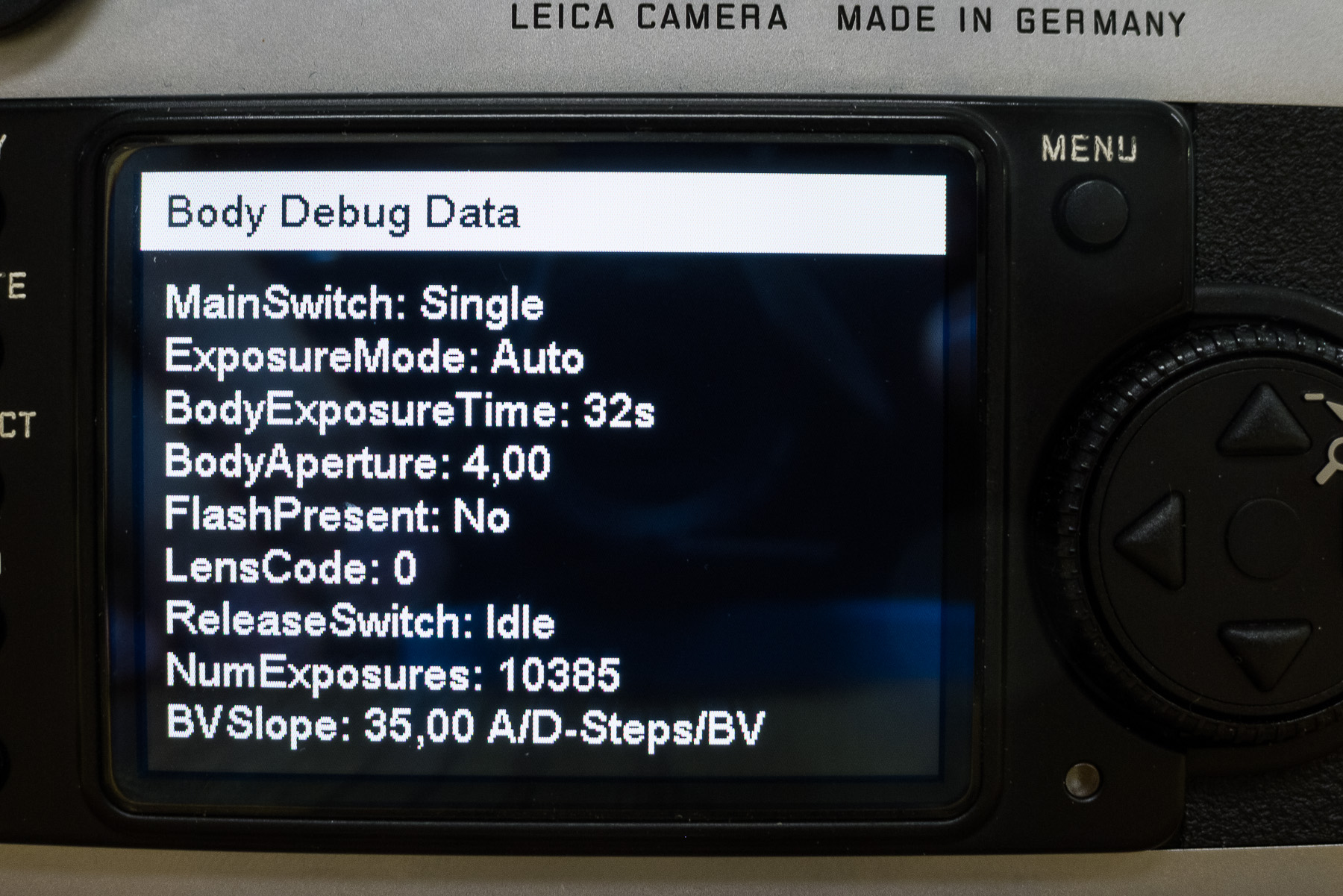
Scroll down to NUMEXPOSURES.Turn camera off to exit……..
-
October 6, 2012 at 3:48 pm #3066Josh LehrerLegendary Member
 Join Date: Aug 2014Posts: 233Currently using:
Leica M, Leica S, Leica CompactOffline I actually did not know of that shortcut to get to the M8’s service menu, however I can confirm that it works! This is the screen you will see after selecting “Body Debug Data”:
-
October 6, 2012 at 5:26 pm #3068
😀
I knew you’d like that.
-
October 6, 2012 at 5:35 pm #3069Josh LehrerLegendary Member
Join Date: Aug 2014Posts: 233Currently using:
Leica M, Leica S, Leica CompactOffline I tried this on an M9 just for fun, but no luck. Is there a similar service menu for the M9?
-
October 6, 2012 at 10:03 pm #3071
Josh Lehrer;3499 wrote: I tried this on an M9 just for fun, but no luck. Is there a similar service menu for the M9?
There is but it hasn’t been cracked yet.
-
November 21, 2025 at 10:04 am #48187
I spotted the name of this platform in a comment under a meme of all places, so curiosity led me to try it. While exploring, I clicked into the boo casino section around the middle of my browsing. Being in Canada, I liked that everything worked without weird restrictions. I didn’t go big, but a small bonus round paid for my coffee the next morning.
-


You must be logged in to reply to this topic.