

Leica M, Leica S, Leica SL, Leica CL

arminw;3815 wrote: First I have to say I love the camera for its size and image quality. However, what’s it like on a shoot when you have magazine people and art directors in your neck ? I am using the laters edition of Lightroom and Apple’s Retina MacBook Pro with 16 GB of memory and the highest processor Apple offers plus 750 Solit state hard drive .
Shooting thethered is not what it should be like ! I usually use Hasselblad’s phocus and its smooth, the adjustment settings are easy to use and the image comes in fast ready to be reviewed on the screen . With the Leica and Lightroom combo it’s slow, the image needs to be rotated if shot in portrait , again slow and if you use it for half an hour or so it’s so slow you have to restart the program . Come on that can’t be it , can it ?
Another problem I have noticed is Moire ! It’s really bad …. Of course Lightroom offers a moire brush to sort it out but still .
So Leica is great , but software wise I think they have to look into writing a better code to control the camera via Lightroom .
Armin,
Were you shooting compressed DNG or uncompressed? This makes a big difference with transfer speed, and the compression is totally lossless. I think Leica did a disservice to even have the uncompressed option on there as most will think it offers better quality – it doesn’t.
Also, LR tethering was MUCH faster before v4. Be it all the additional image processing algorithms and improvements or otherwise, LR4 is much, much slower than LR3. Even simple tasks like 1:1 zoom can be painfully slow. My hope is that this is addressed in the near future.
According to Leica, USB2 isn’t the bottleneck, and I’m inclined to agree. If you bring up the folder where the images are being deposited, you can see them show up well before they are displayed in LR.
Another potential issue is OS X. When we first ran speed comparison tests between LR3.2/S2 tethering and C1/P45+, we saw a large disparity between Windows 7 and OS X. For our testing, we used the same i7 iMac and used Boot Camp to boot into Windows. So, the hardware was identical. I questioned Adobe about this and was told it was a limitation of memory handling in OS X that was to blame.
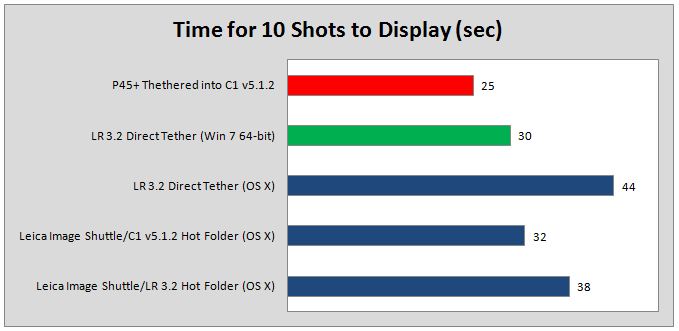
The other option, rather than going straight into LR, is to use Leica Image Shuttle software and preview the files in Bridge. One of the Leica S team members showed me this workflow at Photokina with the new S and it was very quick. And advantage of using Shuttle is that you can have it display a quick preview before the image is even fully transferred. The 2MP preview JPG that is rendered on the fly for display on the rear LCD is pushed over the wire first and shows up in a separate preview window about 1.5 seconds after capture. This is useful for checking composition, model expression, lighting, etc. with a quick glance. If you want to check focus, you’d then only have to wait another 4 or 5 seconds until the full image is rendered in LR (or Bridge).
I recently got a new laptop (a PC, not a Mac) and will run a quick tether test when I get a chance. Unfortunately, I don’t have a rMBP to test against, just a 2010 dual i7 15″ MBP.
Red Dot Forum
Leica Store Miami