

Leica M, Leica S, Leica SL, Leica CL

Roger;641 wrote: Thanks Josh
I know as you build an archive overtime that there is an advantage to having some consistency in rendering. For example when the pros look back at their life s work ..its nice that everything they shot on kodachrome or tri x has a similar look. For example look at the Leica video on Steve McCurry ….the images that were taken years apart hang together .
So my goal is to have the S2 and M9 files render in a similar way .
My question on clarity really comes from more recent insights on LR3 and how Adobe has worked in improvements in the raw conversions. This may be more related to Nikon files which suffer from the AA filter and benefit greatly from deconvolution algorithms . But the logic was similar above 50% the algorithms start to kick in. I will ask on the adobe forums. (most leica users developed their presets during prior versions of LR ) .
Roger,
I think you may be confusing clarity with detail. The detail slider under the sharpening settings acts in this way:
0 = 100% USM
50 = 50/50 USM + deconvolution
100 = 100% deconvolution
I prefer to set the slider to 75, which emphasizes the deconvolution method which I prefer for textural detail with a bit of USM which enhances edge contrast. Here’s the sharpening settings from my S2 preset ( David’s LR 3.4.1 Preset – S2.lrtemplate ) which I use as a starting point for all my S2 files:
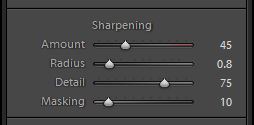
My clarity is pegged at +7 and never moves. I have, on occasion, brushed in some negative clarity using the local adjustment brush. Just a little goes a long way in a portrait without softening the image overall.
Red Dot Forum
Leica Store Miami